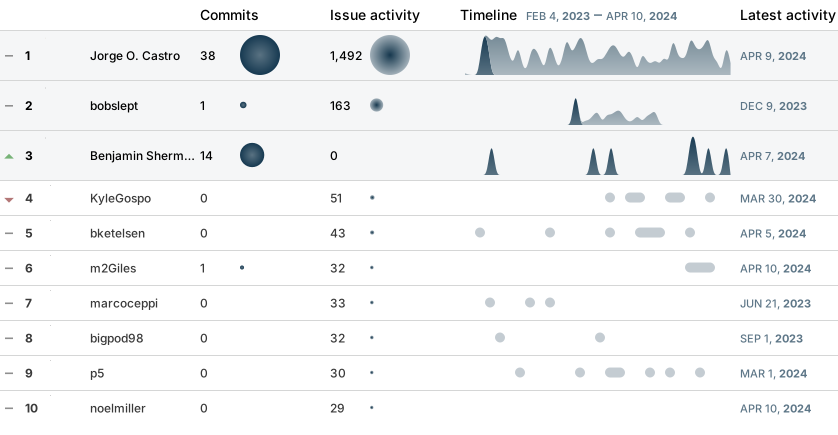
| .github | ||
| dx | ||
| etc | ||
| framework | ||
| toolboxes | ||
| usr | ||
| artifacthub-repo.yml | ||
| boot_menu.yml | ||
| build.sh | ||
| CHANGELOG.md | ||
| Containerfile | ||
| cosign.pub | ||
| LICENSE | ||
| packages.json | ||
| README.md | ||
| workarounds.sh | ||

bluefin
This image is considered Beta


A familiar(ish) Ubuntu desktop for Fedora Silverblue. It strives to cover these three use cases:
- For end users it provides a system as reliable as a Chromebook with near-zero maintainance, with the power of Ubuntu and Fedora fused together
- For developers we endeavour to provide the best cloud-native developer experience by enabling easy consumption of the industry's leading tools. These are included in dedicated
bluefin-dxandbluefin-dx-nvidiaimages - For gamers we strive to deliver a world-class Flathub gaming experience

"Let's see what's out there." - Jean-Luc Picard
Usage
- Download and install the ISO from here:
- Select "Install ublue-os/bluefin" from the menu
- Choose "Install bluefin:38" if you have an AMD or Intel GPU
- Choose "Install bluefin-nvidia:38" if you have an Nvidia GPU
- Follow the rest of the installation instructions
- Select "Install ublue-os/bluefin" from the menu
For existing Silverblue/Kinoite users
-
After you reboot you should pin the working deployment so you can safely rollback.
-
[AMD/Intel GPU users only] Open a terminal and rebase the OS to this image:
Bluefin:
sudo rpm-ostree rebase ostree-image-signed:docker://ghcr.io/ublue-os/bluefin:38Bluefin Developer Experience:
sudo rpm-ostree rebase ostree-image-signed:docker://ghcr.io/ublue-os/bluefin-dx:38 -
[Nvidia GPU users only] Open a terminal and rebase the OS to this image:
Bluefin:
sudo rpm-ostree rebase ostree-image-signed:docker://ghcr.io/ublue-os/bluefin-nvidia:38Bluefin Developer Experience:
sudo rpm-ostree rebase ostree-image-signed:docker://ghcr.io/ublue-os/bluefin-dx-nvidia:38 -
Reboot the system and you're done!
-
To revert back:
sudo rpm-ostree rebase fedora:fedora/38/x86_64/silverblue
Check the Silverblue documentation for instructions on how to use rpm-ostree. We build date tags as well, so if you want to rebase to a particular day's release you can use the version number and date to boot off of that specific image:
sudo rpm-ostree rebase ostree-image-signed:docker://ghcr.io/ublue-os/bluefin:37-20230310
The latest tag will automatically point to the latest build.
Features
This image heavily utilizes cloud-native concepts.
System updates are image-based and automatic. Applications are logically seperated from the system by using Flatpaks, and the CLI experience is contained within OCI containers:
For Users
- Ubuntu-like GNOME layout
- Includes the following GNOME Extensions
- Dash to Dock - for a more Unity-like dock
- Appindicator - for tray-like icons in the top right corner
- GSConnect - Integrate your mobile device with your desktop
- Blur my Shell - for that bling
- Includes the following GNOME Extensions
- GNOME Software with Flathub
- Use a familiar software center UI to install graphical software
- Built on top of the the Universal Blue main image
- Extra udev rules for game controllers and other devices included out of the box
- All multimedia codecs included
- System designed for automatic staging of updates
- If you've never used an image-based Linux before just use your computer normally
- Don't overthink it, just shut your computer off when you're not using it
For Developers
bluefin-dx - The Bluefin Developer Experience
Dedicated developer image with bundled tools. It endevaours to be the world's most powerful cloud native developer environment. :) It includes everything in the base image plus:
- VSCode and related tools
- virt-manager and associated tooling
- Cockpit for local and remote management
- Podman and Docker extras
- Automatically aliases the
dockercommand topodman - podman.socket on by default so existing tools expecting a docker socket work out of the box
- Automatically aliases the
- LXC and LXD
- A collection of well curated monospace fonts
- hashicorp repo included and enabled
- None of them installed by default, but you can just add them to the Containerfile as you need them
- Built-in Ubuntu user space
Ctrl-Alt-u- will launch an Ubuntu image inside a terminal via Distrobox, your home directory will be transparently mounted- A BlackBox terminal is used just for this configuration
- Use this container for your typical CLI needs or to install software that is not available via Flatpak or Fedora
- Optional ubuntu-toolbox image with Python, and other convenience development tools.
just distrobox-bluefinto get started. To configurejustfollow the guide. - Optional universal image with Python, Node.js, JavaScript, TypeScript, C++, Java, C#, F#, .NET Core, PHP, Go, Ruby, and and Conda.
just distrobox-universalto get started just assembleshortcut to decleratively build distroboxes defined in/etc/distrobox/distrobox.ini- Refer to the Distrobox documentation for more information on using and configuring custom images
- GNOME Terminal
Ctrl-Alt-t- will launch a host-level GNOME Terminal if you need to do host-level things in Fedora (you shouldn't need to do much).
- Cloud Native Tools
- DevPod - reproducible developer environments, powered by devcontainers - Nix-powered Development Experience powered by Devbox
- Introducing Fleek
just nix-devboxto get startedjust nix-devbox-globalto install a global profile- Check out Devbox for more information
- Introducing Fleek
- Quality of Life Improvements
- systemd shutdown timers adjusted to 15 seconds
- Tailscale for VPN
- Just task runner for post-install automation tasks. Check out our documentation for more information on using and customizing just.
fishandzshavailable as optional shells, usejust fishorjust zshand follow the prompts to configure them
Framework Images
Bluefin is available as an image for the Framework 13 laptop that comes preconfigured with tlp and the recommended power settings from the Framework Knowledge Base
Note that the default image works fine on the Framework 13, this image provides tweaks and further improvements. Additionally if you have power profiles that you think would be useful for the community please send a pull request!
-
Rebase to the -framework image:
Bluefin:
sudo rpm-ostree rebase ostree-image-signed:docker://ghcr.io/ublue-os/bluefin-framework:38Bluefin Developer Experience:
sudo rpm-ostree rebase ostree-image-signed:docker://ghcr.io/ublue-os/bluefin-dx-framework:38 -
Reboot!
-
Then run this command to set the right kernel arguments for the brightness keys to work:
just framework-13
Then reboot one more time and you're done!
Roadmap and Future Features
- Fedora 38 will be the initial release and will be considered Beta
- Fedora 39 is the target for an initial GA release
These are currently unimplemented ideas that we plan on adding:
- Provide a
:gtstag aliased to the Fedora -1 release for an approximation of Ubuntu's release cadence - Provide a
:ltstag derived from CentOS Stream for a more enterprise-like cadence - Firecracker - help wanted with this!
Applications
- Mozilla Firefox, Mozilla Thunderbird, Extension Manager, Libreoffice, DejaDup, FontDownloader, Flatseal, and the Celluloid Media Player
- Core GNOME Applications installed from Flathub
- GNOME Calculator, Calendar, Characters, Connections, Contacts, Evince, Firmware, Logs, Maps, NautilusPreviewer, TextEditor, Weather, baobab, clocks, eog, and font-viewer
- All applications installed per user instead of system wide, similar to openSUSE MicroOS. Thanks for the inspiration Team Green!
Recommended Extensions
The authors recommend the following extensions if you'd like to round out your experience. Use the included "Extensions Manager" application to search for these extensions, everything you need to get them to run is already included:

(Note: Installing extensions via extensions.gnome.org won't work, the extensions must be installed via this application)
- Tailscale Status for VPN
- Pano for clipboard management
- Desktop Cube if you really want to go retro
Verification
These images are signed with sigstore's cosign. You can verify the signature by downloading the cosign.pub key from this repo and running the following command:
cosign verify --key cosign.pub ghcr.io/ublue-os/bluefin
Building Locally
-
Clone this repository and cd into the working directory
git clone https://github.com/ublue-os/bluefin.git cd bluefin -
Make modifications if desired
-
Build the image (Note that this will download and the entire image)
podman build . -t bluefin -
Podman push to a registry of your choice.
-
Rebase to your image to wherever you pushed it:
sudo rpm-ostree rebase ostree-image-signed:docker://whatever/bluefin:latest
Frequently Asked Questions
What about codecs?
Everything you need is included. You will need to configure Firefox for hardware acceleration
How do I get my GNOME back to normal Fedora defaults?
We set the default dconf keys in /etc/dconf/db/local, removing those keys and updating the database will take you back to the fedora default:
sudo rm -f /etc/dconf/db/local.d/01-ublue
sudo dconf update
If you prefer a vanilla GNOME installation check out silverblue-main or silverblue-nvidia for a more upstream experience.
Should I trust you?
This is all hosted, built, and pushed on GitHub. As far as if I'm a trustable fellow, here's my bio. If you've made it this far then hopefully you've come to the conclusion on how easy it would be to build all of this on your own trusted machinery. 😄
 / Recent activity

/ Top contributors